

August 23, 2018
A quick guide – using DropTask’s new Planner for personal productivity
*PLEASE NOTE – DropTask is now Ayoa – an all-in-one tool for idea generation and collaboration, that goes beyond traditional task management. Discover Ayoa and achieve your best work.*
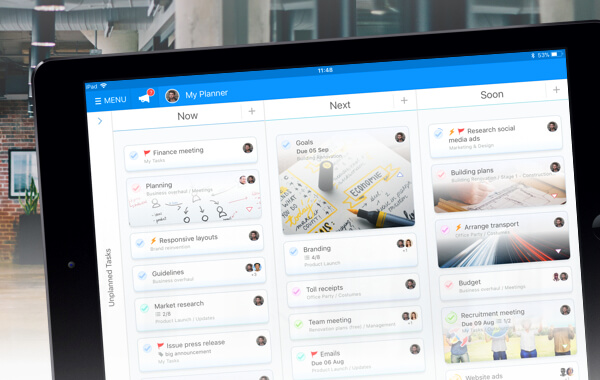
When you’re part of lots of collaborative projects, keeping your priorities in sync can be a challenge. You need a space to view all the tasks that lie ahead of you, so you can work through your responsibilities strategically – without letting anything slip. We designed your DropTask Planner with this in mind.
Work collaboratively, but in your own way
Your Planner is yours and yours alone. It is only visible to you and cannot be found by anyone else in your team. This makes it the perfect place for personal prioritization. As you are planning projects in Canvas or Workflow View, you can schedule your own tasks for Now, Next or Soon and find a copy of them in your Planner. Visual markers – that only you can see – are added to specific tasks in your projects, helping you to keep your own priorities in mind.

Give all your tasks one home
It’s unrealistic to think that all tasks come from projects. Some tasks just crop up, out of nowhere, and they need to get done. Your Planner allows you to create standalone tasks that can live outside of projects. They only exist in your Planner, and you can schedule them for Now, Next or Soon depending on how quickly they need to be completed. Introduce these standalone tasks and get them ticked off alongside your project tasks. Keeping all your to-dos in one place, no matter where they come from, will help to keep your priorities balanced and in sync.

Work flexibly to your own deadlines
You’ll notice that your Planner is dateless. We’re giving you the freedom to set your own time parameters. Tasks on your Now board might need to be dealt with before lunchtime, but, for another DropTask Planner user, that same Now board may consist of tasks that are to be completed before the end of the week. It’s down to you and how you work best. And, as priorities shift and new tasks arise, you can rejig your Planner to reflect what’s now most important. In the modern world, you must be flexible in order to achieve. The ability to pivot and reassess your priorities is crucial, and DropTask’s Planner allows you to do just that.
New to Ayoa? Discover more and sign up today, and start achieving your best work.